


Ideal Dash Cam Setup for Rideshare Drivers
As a rideshare or delivery driver, having the ideal dash cam setup can be a game-changer. Not only does it provide essential evidence in case of accidents or disputes, but it also enhances your overall safety on the road. In this article, you'll discover the key features to look for in a dash cam, how to position it for maximum effectiveness, and tips for maintaining your device.

Essential Components of an Ideal Dash Cam Setup
A well-equipped dash cam setup boosts safety and provides clear evidence during incidents. Focus on the following components to ensure reliability.
Camera Unit
Select a dash cam with high-resolution video capability. Look for features such as night vision and a wide field of view. Consider a continuous recording option to capture every moment. A wireless dash cam offers installation flexibility and easier maintenance. Dual-channel cameras record both front and rear views for comprehensive coverage.
Mounting Solutions
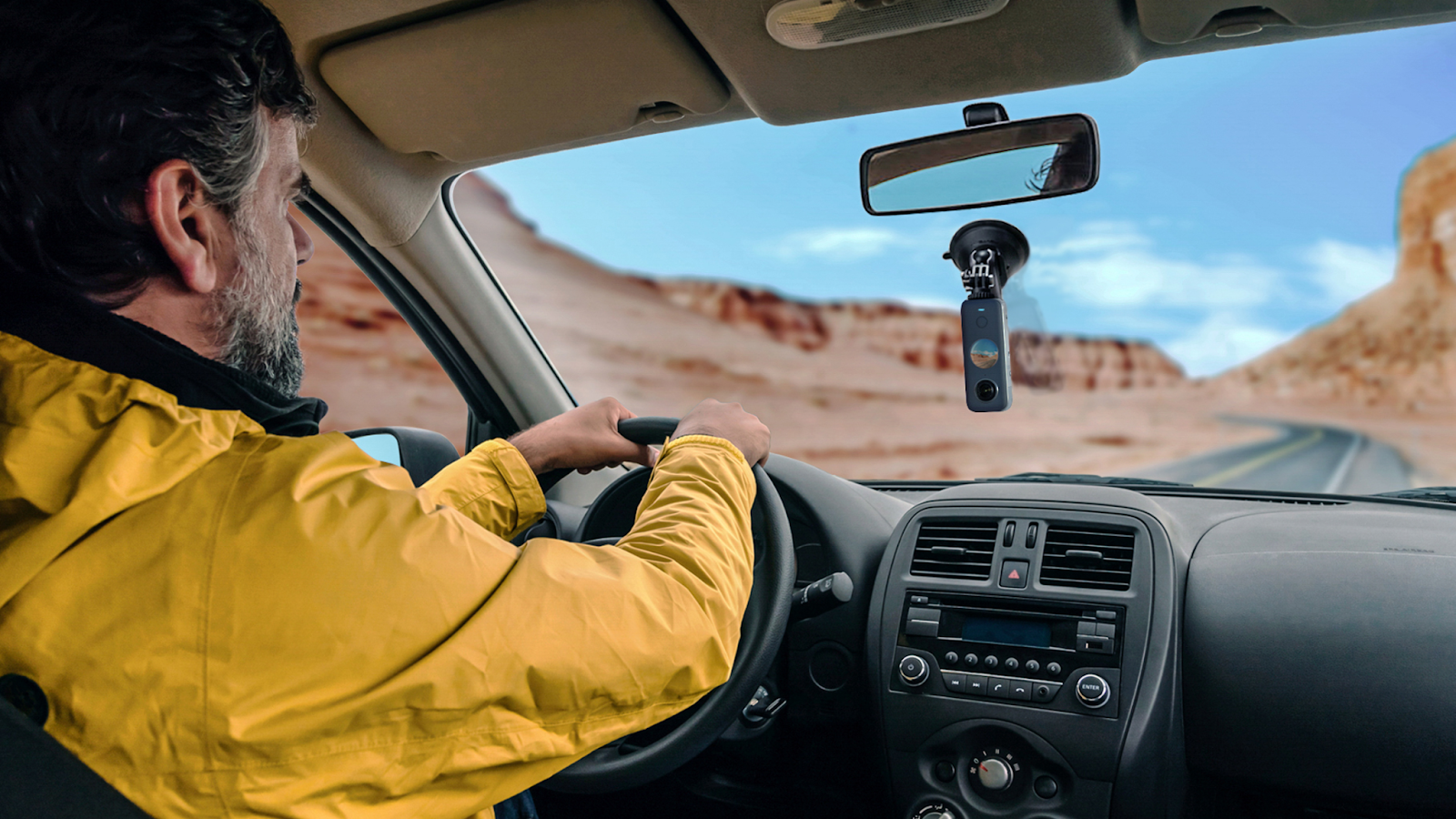
Choosing the right mounting option matters. Fixed mounts provide stability, while adhesive mounts ensure a secure grip to the windshield. Look for mounting solutions that allow for easy adjustments in angle for optimal video capture. Suction cup mounts enable quick removal and reinstallation, making them ideal for rideshare drivers.
Power and Wiring
Reliable power sources ensure uninterrupted recording. Hardwiring kits are used for clean installation and to eliminate issues with battery drainage. Some dash cams offer battery protection features to prevent power loss during operation. Explore options that support USB or Type-C connections for easy power management.
Storage and Memory
Adequate storage capacity prevents data loss from overwritten files. Select microSD cards with high write speeds to support continuous recording. Cards rated V30 or better ensure reliable, high-performance performance. Regular formatting helps maintain optimal functionality and prevents storage issues.
Key Features to Evaluate
Evaluate these important features for an ideal dash cam setup to maximize safety and efficiency.
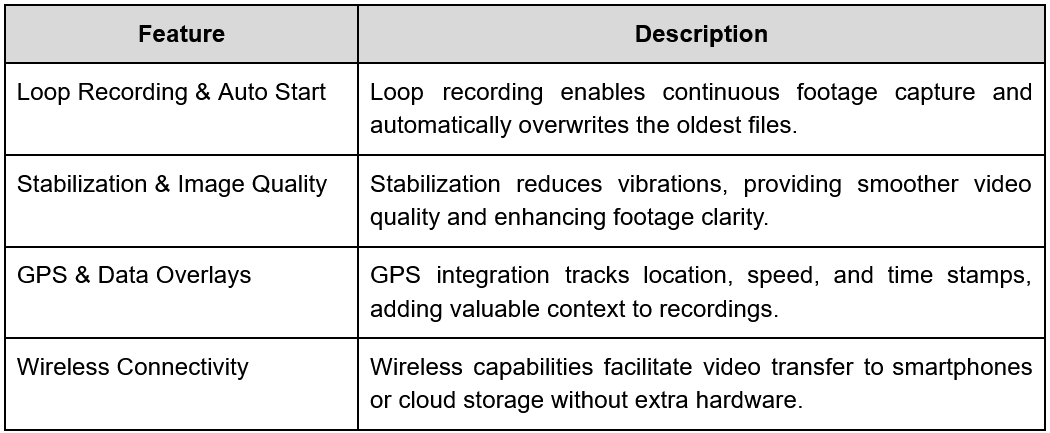
Installation Best Practices for Rideshare & Delivery Drivers
The efficient dash cam installation enhances safety and provides valuable evidence in encounters. Follow these practices to optimize functionality and security.
Optimal Placement
Position the dash cam behind the rearview mirror on the windshield. This placement maximizes visibility of the road ahead and minimizes distractions. You gain an unobstructed view while maintaining recording effectiveness. Ensure the camera’s angle captures critical areas without blocking driver sightlines.
Discreetness & Security
Select a compact dash cam model that complements your vehicle's interior. Mount the camera securely to prevent movement while driving. Look for features such as tamper-proofing or locking mechanisms that protect against unauthorized access. A secure installation deters theft while preserving the device's functionality.
Maintenance & Firmware Updates
Regular firmware updates improve performance and security. Check for updates frequently to keep the dash cam functioning optimally. Clean the lens regularly to prevent dirt and smudges from affecting video quality. Choose a memory card with sufficient storage capacity, formatted correctly to handle ongoing recording.
Choosing the Best Dash Cam for Your Needs
Selecting a dash cam suitable for rideshare and delivery drivers involves evaluating crucial features and specifications. You want clarity, reliability, and ease of access to footage.
Camera Configurations
Focus on configurations that provide comprehensive coverage.
- Front-facing camera: Captures the road ahead.
- Cabin camera: Records interactions with passengers, which is vital for ridesharing.
- Rear camera: Helpful for delivery, especially in urban areas.
Opting for a dual- or triple-channel dash cam maximizes visibility and safety.
Budget Considerations
Dash cam options vary significantly in features and capabilities. Consider the following options:
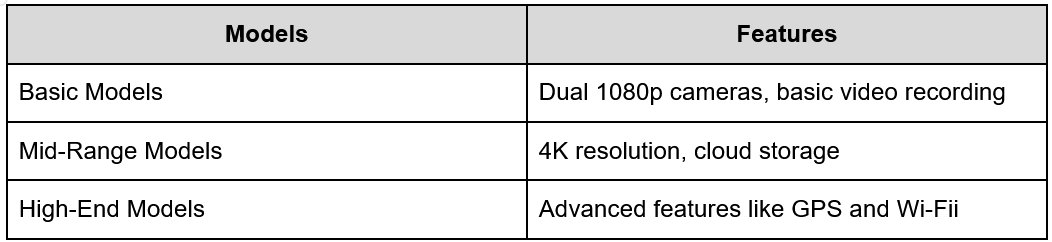
Select a model that fits your budget and meets the needs of your driving environment.
Wireless Dash Cam Advantages
Many modern dash cams offer wireless connectivity. This feature allows for:
- Easy footage transfer: Share video clips via mobile apps.
- Real-time alerts: Receive notifications for incidents.
- Cloud backup: Safeguard recordings in case of device damage.
Wireless capabilities enhance the user experience, especially when accessing and sharing evidence.
Recommended Specs for Rideshare/Delivery
Prioritize specific features and specifications for optimal performance:
- Resolution: At least 1080p; 4K for the highest clarity.
- Night vision: Ensures clear footage during low-light conditions.
- Loop recording: Prevents space issues by overwriting older files.
- Parking monitor: Activates recording upon detecting impact when the car is parked.
- Storage capacity: MicroSD cards of 64GB to 400 GB+ are preferable for extensive video storage.
Selecting the right specs improves footage quality and enhances your driving safety. Thus, consider buying a wireless dash cam.
Configuring a 360° Action Camera as a Dash Cam
A 360° action camera can provide rideshare and delivery drivers a unique advantage by capturing a complete view of their surroundings. This setup may improve safety and accountability.
Why 360°?
A 360° camera like Insta360 offers comprehensive coverage, helping record all angles around the vehicle. This capability can aid in resolving disputes or documenting incidents effectively. Such systems often minimize blind spots that traditional dash cams might miss.
Step-by-Step Setup (Insta360 X4 model)
- Mount
Secure the camera to the windshield or dashboard, ensuring the lens provides an unobstructed view.
- Power
Connect to a power source, like a car charger or hardwire kit, to maintain recording capability throughout your shift.
- Dashcam Mode
Activate dashcam mode, featuring loop recording and motion detection to manage video files automatically.
- Loop Settings
Adjust loop recording intervals to ensure continuous footage capture. Standard settings often range from one to five minutes.
- Wireless
Set up wireless connectivity for easier video transfer and remote access, streamlining the footage management process.
This configuration optimizes using a 360° camera while ensuring effective documentation of your driving activities.
Conclusion
Equipping your vehicle with the right dash cam setup is essential for rideshare and delivery drivers. By focusing on key features such as high-resolution recording, reliable power sources, and effective storage solutions, you can ensure that you are well-prepared for any situation on the road. Additionally, maintaining your dash cam and staying informed about local recording laws will enhance your safety and provide peace of mind. Ultimately, investing in a quality dash cam protects you and fosters trust with your passengers, making for a safer driving experience overall.
compare phone plans and save up to 80%


.svg)
.svg)

compare your carrier and save up to 63%


.svg)

.svg)

